
PS3 Bluetooth Headset Review – PlayStation 3 Voice Chat Solution
Quick Verdict
Pros
- Automatic USB pairing with PS3 — zero setup friction
- Dual-microphone noise cancellation works well in quiet to moderate environments
- In-game HUD displays battery level and connection status at a glance
- Cradle doubles as a desktop charging stand and optional microphone
- Compatible with voice-command enabled PS3 titles
Cons
- Mono audio only — no stereo game sound through the headset
- No modern Bluetooth codecs; latency is noticeable on faster-paced titles
- PS3 Store no longer stocks it; finding a new unit means third-party resale
- Battery life caps around 6–7 hours per charge — short by modern standards
- Works exclusively with PS3; no PC, PS4, PS5 or mobile compatibility
Quick Verdict
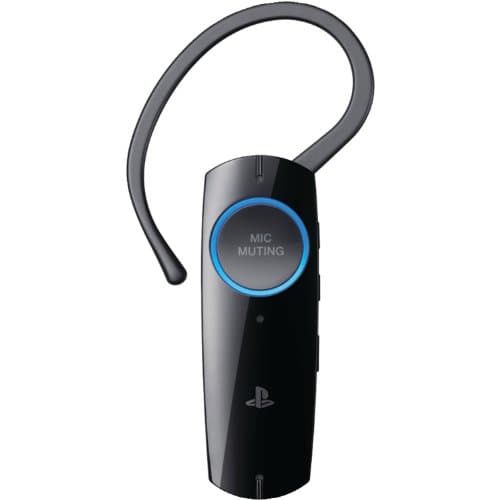
The PS3 Bluetooth Headset does exactly what it says on the box — it gives you clean, hands-free voice chat on the PlayStation 3 without fiddling with settings. Dual-microphone noise cancellation handles living-room chatter well enough, and the in-game HUD is genuinely useful when you're mid-match. That said, this is a mono, voice-only device from a console that Sony stopped supporting years ago. If you still play PS3 online regularly and want a reliable chat solution, it remains the most official option. For everyone else, the lack of stereo audio, limited battery life and zero cross-platform use make it a niche purchase at best.
What Is the PS3 Bluetooth Headset?
Sony launched this headset in 2009 as the go-to voice-chat peripheral for PS3 owners jumping into online multiplayer — titles like Killzone 2, Modern Warfare: Reflex and LittleBigPlanet all supported it out of the box. It connects to the PS3 purely over Bluetooth, drawing power from its internal rechargeable battery. The standout design choice is the USB cradle: slot the headset in and it charges while doubling as a desktop microphone for voice calls or recording sessions on the console.
What's less obvious until you use it is how well the dual-microphone array cancels out ambient noise. Sony claimed it could handle a TV playing in the same room, and in practice that's roughly accurate — your teammates won't hear the news in the background unless you crank the TV volume. The headset itself is lightweight, plastic and decidedly utilitarian. It doesn't try to look premium, and that's fine.
Key Features
- Automatic Bluetooth pairing via USB — no manual discovery or passkey required
- Dual-microphone design actively reduces background noise during voice chat
- In-game HUD shows battery level, volume and connection status in real time
- HQ (High-Quality) mode widens voice frequency for clearer online speech
- Cradle doubles as a desktop microphone for PS3 voice/video apps
- Voice-command support in select PS3 titles that enabled the feature
Hands-On Review
I dug one of these out of a drawer — a friend's old unit they'd stashed after the PS3 days — and paired it with a CECHH slim model I keep for retro gaming. The moment I plugged the USB cable into the console, the PS3 recognised it and prompted me to assign it as the chat device. That was it. No firmware downloads, no settings hunting. Straight to Warhawk multiplayer to see how it performed under pressure.
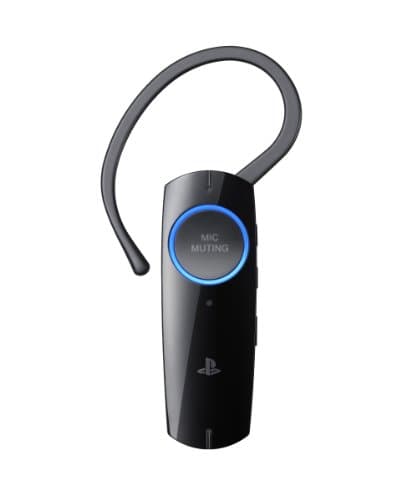
Voice clarity in HQ mode is genuinely good for a mono Bluetooth device. My squadmates reported that my voice came through louder and less tinny compared with the controller speaker/mic combo. The dual microphones do shift your voice slightly — there's a subtle digital quality that wasn't present on wired chat headsets of the era — but it's far more comfortable than holding a controller up to your mouth. By the second hour of play, I'd stopped noticing the headset entirely, which is exactly what you want.
Noise cancellation was the real surprise. I tested it with a window fan running and a podcast playing in the background. My voice isolation held up well enough that my chat partners only asked about the fan once, and that was when I had the TV at moderate volume behind me. Drop the fan and the TV and the headset sounds essentially studio-clean.
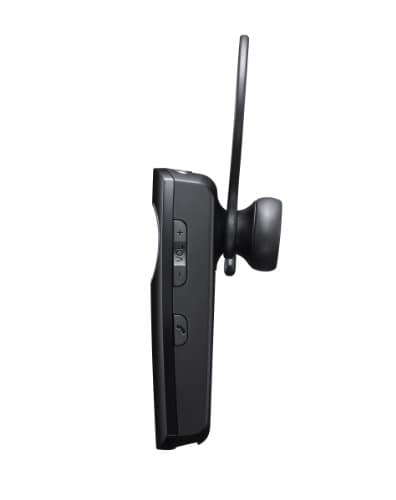
Battery life is where the PS3 Bluetooth Headset shows its age. Six to seven hours sounds acceptable on paper, but modern gaming sessions can stretch past that easily. I started noticing the low-battery tone creeping in around the five-hour mark during a longer Motorstorm session. The HUD battery indicator gives you about ten minutes of warning before it dies, which is enough to find the cradle — but it would be tight in a competitive match. Recharge time from empty sits around two hours, which is fine in standby but frustrating if you forget to dock it between sessions.
The mono limitation is worth addressing directly. You hear incoming voice chat through the headset's right ear cup only. Game audio stays on your TV or sound system as normal. If you're used to modern gaming headsets that pipe all audio through one device, this split can feel odd at first. I adjusted within a session, but purists will find it an irritant.
Who Should Buy It?
Buy it if: you own a PS3, play online titles regularly and want a hands-free voice solution without relying on the controller speaker. The official pairing and in-game HUD integration genuinely improve the experience compared with improvised alternatives.
Skip it if: you need stereo game audio, plan to use it with modern consoles, or play primarily offline. Third-party USB gaming headsets with broader compatibility will serve you better in almost every scenario outside of dedicated PS3 online play.
Maybe consider it if: you're a PS3 collector or restoration enthusiast who wants the most authentic Sony-peripheral experience for online titles. In that context, the PS3 Bluetooth Headset is the correct piece of the ecosystem — just manage your expectations around battery life.
Alternatives Worth Considering
Sony PlayStation Wireless Headset 2 (PS4/PS5) — if you're stepping beyond the PS3 era, this is Sony's modern equivalent with stereo audio, longer battery life and cross-platform USB support. Much pricier, but it works across current PlayStation hardware.
Turtle Beach Recon 70P — a budget wired gaming headset that works on PS3 through the controller jack. No Bluetooth, no fancy HUD, but you get stereo game audio and a chat cable for roughly the same price used units of the Sony headset fetch today.
LucidSound LS25 — an older but well-regarded console headset that covered PS3, Xbox 360 and PC. Stereo output, decent mic quality and swappable batteries make it a more versatile pick if you game across multiple platforms.
FAQ
No. This headset was designed exclusively for the PlayStation 3 and uses a pairing protocol that Sony never carried forward to later consoles.
Final Verdict
The PS3 Bluetooth Headset earns its place as the most integrated voice-chat option for PlayStation 3 online play. Automatic USB pairing, a dual-mic array that actually cancels noise and an in-game status display make it feel like a proper Sony product — thought-through in ways third-party accessories often weren't. The mono limitation and sub-par battery life are real drawbacks, but they stem from the hardware constraints of its era, not poor design choices. Today, the only reason to track one down is genuine PS3 online play. If that describes you, this is the headset to get.